
 I am my wife Becky’s password manager. I keep all of her passwords (and mine) in an encrypted Excel spreadsheet – something I’ve done since before password manager applications existed.
Yesterday I had reason to log into her Amazon account to help her place an order for puppy food and encountered a surprise. The password I’d diligently saved in my spreadsheet (and which Firefox had also helpfully saved for me) didn’t work. Instead, Amazon told me the password was invalid and suggested that I log in with a passkey.
So I asked Becky if she’d created a passkey for Amazon. She didn’t know. She looked in the passwords application on her iPhone, and sure enough, she had a passkey saved for amazon.com.
I knew it should be possible to use the passkey on her iPhone from Firefox on Windows 11 to sign into amazon.com, but I’d never actually tried it myself. I work on this stuff after all, so I thought I’d give it a go. Here was my experience, to the best of my recollection…
- When trying to sign into Becky’s Amazon account in Firefox on Windows 11 – something I’d done many times before, amazon.com told me that the password for Becky’s account was invalid. (It was the same password she’d always had and she hadn’t changed it.) It then asked if I wanted to sign in with a passkey.
- Having confirmed with Becky that she had a passkey for amazon.com on her iPhone, I clicked the “Sign in with a passkey” button.
- I was asked whether my passkey was in Windows Hello or on an iPhone or iPad or Android device. I clicked the “iPhone or iPad or Android device” button.
- I was told to scan a QR code that Windows presented. We scanned it with Becky’s iPhone. The iPhone asked a confirmation question about whether we wanted to release the passkey to another device (the details of which I can’t recall). I said “Yes”.
- Apple (or maybe Amazon?) sent her iPhone a text message with a 6-digit code that we had to enter to confirm that we wanted to release the passkey. We did that.
- Sometime during this process, Windows brought up dialog box that told me my Bluetooth was off and asked me if I wanted to turn it on. I said “Yes” and it helpfully took me to another dialog that let me turn it on. I’ll note that it didn’t explain why I would want to turn Bluetooth on. (I knew, because I worked on the FIDO Hybrid flow, but that makes me highly unusual.) I suspect that to most people, that would be a mystery and probably a non sequitur. Many might have said “No”.
- Soon after that, Windows (or maybe Amazon?) asked me if wanted to duplicate the passkey to this device. I said “Yes”.
- And voila, I was logged into Becky’s Amazon account in Firefox on Widows 11!
- At this point I decided to go for broke. I logged out of Amazon. And tried to log back in.
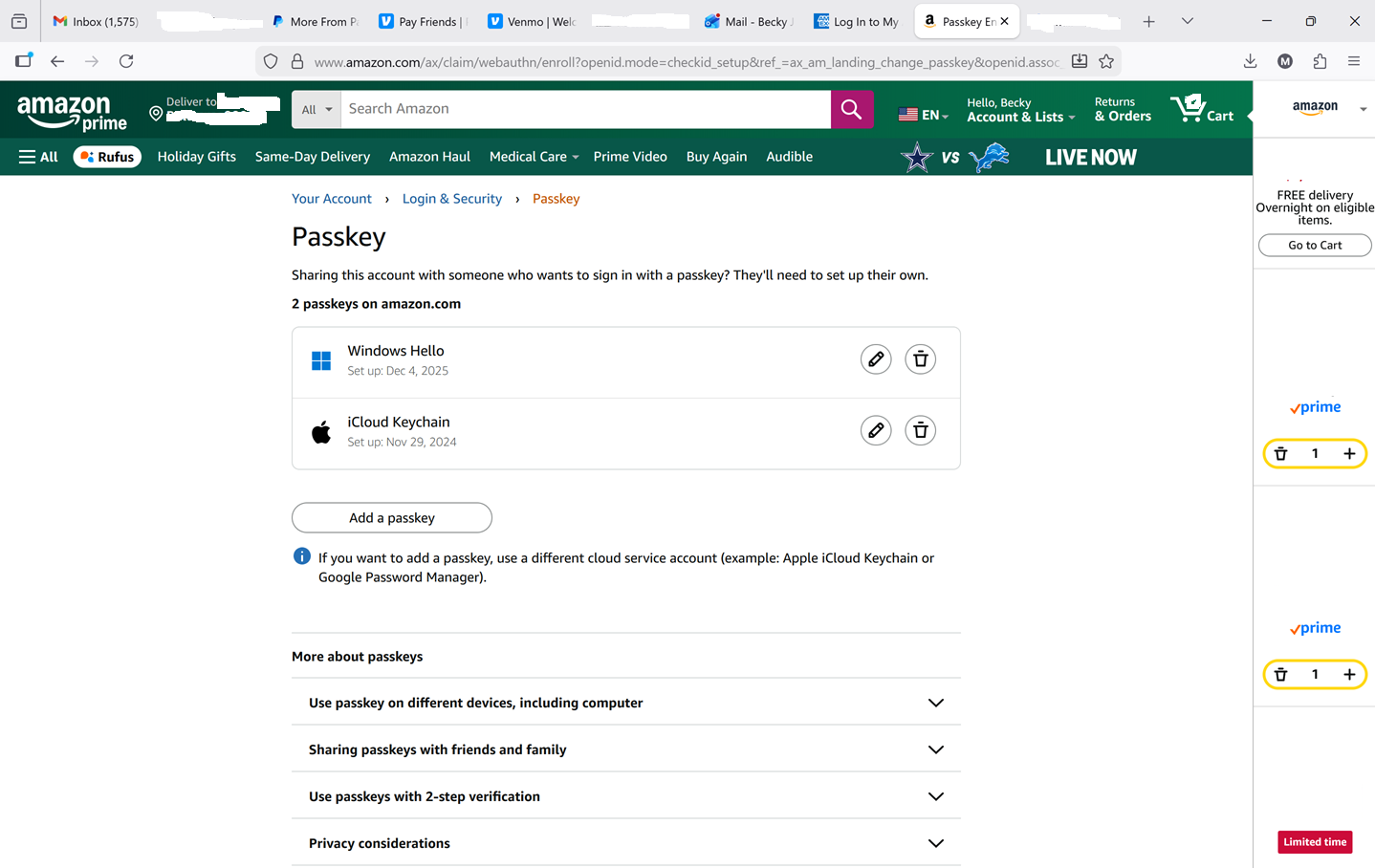
- After entering her e-mail address as the username, Amazon prompted me to log in with a passkey. I did that, only this time no QR code was presented, we didn’t use her phone at all, and I was apparently logged in using a passkey saved in Windows Hello.
- So I was once again back to a state where I could log into Amazon as Becky on my Windows machine in Firefox, just like I previously could with a password.
- This user experience left me with a question: Was the passkey on her iPhone truly duplicated to Windows or did Amazon create a different passkey? (I suspected the latter.) Visiting the Your Account / Login & Security / Passkey page at Amazon (which required entering another 6-digit code) gave me the answer:
Observations and Conclusions
- It all worked. I didn’t know that it would – especially since it involved four vendors: Amazon, Microsoft, Mozilla, and Apple. That, in and of itself, was impressive.
- There were a lot of steps to navigate, some of them unexplained. I knew the right answers to make it work. I wasn’t deterred when I was told the password was wrong. I turned Bluetooth on when prompted. I scanned the QR code. I agreed to release the passkey to another device. I agreed to duplicate the passkey to this device. Others might not have achieved the same outcomes. (I’d love to see the results of a user study among a representative population trying to do the same thing. Can anyone point me to something like that?)
- Congratulations to all the engineers at all these platforms who have put in the significant effort to make this all work together! It’s a testament both to the interoperability made possible by the standards and to your implementations of them.
I’d be interested in hearing about others’ passkey adventures.
Leave a Reply
You must be logged in to post a comment.